QR codes explained: how they work and how to make one people actually scan
August 13, 2026
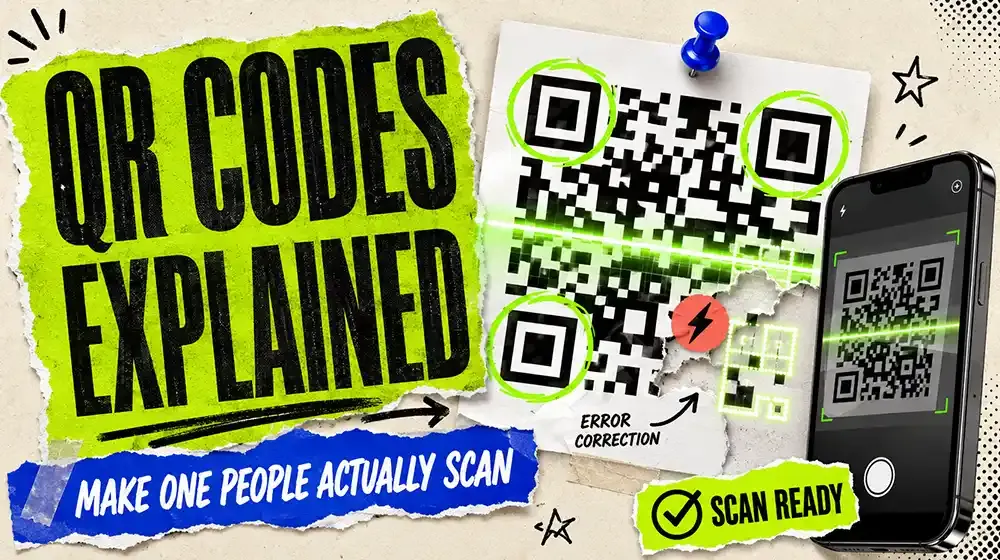
QR codes spent about fifteen years as a punchline and then quietly became infrastructure. Restaurant menus, payments, boarding passes, packaging, parcel lockers, event tickets.
What changed was not the technology. It was that phone cameras started reading them natively, so scanning stopped requiring a special app. The moment that friction disappeared, the format made sense.
What a QR code actually is
A QR code is a two-dimensional barcode: a grid of black and white modules encoding data, readable from any angle. "QR" is short for Quick Response. It was invented in 1994 by Denso Wave, a Toyota subsidiary, to track car parts faster than a traditional barcode allowed.
A few parts of the pattern are worth recognising, because they explain the design constraints:
- The three big squares in the corners are position markers. They tell the scanner where the code is and how it is rotated, which is why a QR code reads upside down and at an angle.
- The dotted lines between them are timing patterns, establishing the size of a single module.
- Everything else is data plus error correction.
Error correction is why the logo trick works
QR codes use Reed-Solomon error correction, at one of four levels. The highest, level H, can reconstruct the full contents with roughly 30% of the code damaged or obscured.
This is not a nice-to-have. It is why a code still scans with a coffee ring on it, a crease through it, or a logo dropped in the middle. Codes with a brand mark in the centre are simply generated at high error correction, with the logo covering area the maths can afford to lose.
The trade: higher error correction means more redundant data in the same code, which means a denser pattern. Push the logo too large and you cross from "recoverable" to "unreadable", usually without warning, because it will still scan on your desk under good light and fail on a wall in a dim room.
Static and dynamic
This distinction matters more than any other choice you will make.
A static code has the destination encoded directly in the pattern. The URL is literally in there. It works forever, needs no service behind it, and can never be changed. Print it wrong and the only fix is reprinting.
A dynamic code encodes a short redirect URL. The pattern points at a service, and the service forwards to wherever you currently want it to go. You can change the destination after printing, and you get scan statistics.
Neither is better. They fail differently, and it is worth understanding how dynamic QR codes work and where they break before committing a print run to one.
The rules that decide whether it scans
Most failed QR codes fail for dull, preventable reasons.
Size
The working rule is distance divided by ten. A code read from 30 cm needs to be about 3 cm across. A code on a wall read from 3 metres needs to be about 30 cm across.
Then add margin, because that formula assumes a decent camera, good light and a still hand. Real conditions are worse than your test conditions, always.
Below about 2 cm you are relying on the scanner having a good macro focus. Do not.
Contrast
Dark pattern on a light background. Every time.
Inverted codes -- light pattern on dark -- fail on many scanners. Some read them, many do not, and you will not find out which until it is printed. The scanner is looking for dark modules on a light field, and inverting that breaks the assumption.
Low-contrast pairings fail the same way: grey on white, navy on black, any pastel on any other pastel. If you would struggle to read text in those two colours, the camera will struggle with the code.
The quiet zone
The blank margin around the code is part of the code. The specification asks for four modules' width of clear space. Crowd the edges with text or a border and scan reliability drops, particularly on busy backgrounds.
Surface and placement
- Curved surfaces (bottles, cans) distort the grid. Keep codes small and on the flattest part.
- Glossy laminate throws camera flash straight back. Matte finishes scan better.
- Placement matters more than people think: a code above shoulder height or below knee height on a poster means someone has to reach or crouch to point a phone at it.
- Never put one where nobody can hold a phone still. Motorway billboards and the inside of a lift are the classic mistakes.
Give people a reason
A bare QR code with no label gets ignored. Three or four words telling people what happens if they scan will do more for your scan rate than any technical adjustment on this list.
"Scan for the menu." "Scan to see the price list." "Scan for 10% off." Anything concrete beats "Scan me", which says nothing.
Test it properly
Before it goes to print:
- Test on both an iPhone and an Android phone. Their scanners differ.
- Test in bad light, not office light.
- Test at the actual printed size, from the actual distance.
- Test the printed proof, not the file on screen. Ink spread on uncoated stock genuinely changes readability.
Where QR codes work well
- Menus, price lists and anything that changes. The paper stays; the content behind it does not have to.
- Packaging. Care instructions, provenance, reordering, registration.
- Events. Tickets, schedules, feedback forms.
- Business cards. A card carrying a link to a full page of contact routes is doing more work than one printed phone number.
- Retail and window displays. A closed shop can still take you to a website.
- Anywhere print meets a screen. That is the honest summary of the whole format.
Where they do not
- Moving vehicles and billboards on fast roads.
- Anywhere with no signal, unless the destination is cached or the code carries the information directly.
- As a replacement for a URL people might want to type. Print both.
- Email and web pages, where a link is strictly better -- most people read email on the same device they would have to scan with.
What else can go in one
URLs dominate, but a QR code is just encoded text, and standard formats exist for:
- Wi-Fi network credentials, so a guest connects without typing a password
- Contact details as a vCard
- Calendar events
- Plain text
- Payment details, which is the format that made QR codes ubiquitous across India and much of Asia
The offline formats -- Wi-Fi, vCard, plain text -- have a real advantage: they work with no internet connection and no service behind them, because the data is genuinely in the pattern.
A short checklist
- Dark on light, strong contrast
- Distance ÷ 10 for size, then add margin
- Keep the quiet zone clear
- Matte, flat surface
- A few words saying why to scan
- Tested on two phones, in bad light, at real size
- Dynamic if the destination might ever change
Klick.ing generates a QR code for every page and every short link, with scan tracking included. Create a free account to make one.